
Nuxt.js + TypeScript + vue-class-component @IntelliJ IDEA
Nuxt.js v2.9.0のリリースノートにあるように、
v2.9.0 からTypeScriptが外部からのサポートになりました。以前からNuxtでTypeScriptを使うときは色々設定したり、
Lintまわりが複雑だったり、コーディングをはじめるまで時間がかかったものの、しばらくすると最新が変わってたり・・・。
今回は2019年11月時点で、Nuxt.js + TypeScriptと IntelliJ IDEA で使えるまでを紹介します。
Nuxtのプロジェクトを作る
$ npx create-nuxt-app example
よくこのコマンドを見ますが、最新の create-nuxt-app を使うためには、
yarn create nuxt-app を使ったほうががいいかもしれません。
$ yarn create nuxt-app example

yarn create v1.17.3
[1/4] 🔍  Resolving packages...
[2/4] 🚚  Fetching packages...
info @google-cloud/functions-emulator@1.0.0-beta.5: The engine "node" is incompatible with this module. Expected version "~6". Got "10.13.0"
info "@google-cloud/functions-emulator@1.0.0-beta.5" is an optional dependency and failed compatibility check. Excluding it from installation.
[3/4] 🔗  Linking dependencies...
[4/4] 🔨  Building fresh packages...
success Installed "create-nuxt-app@2.11.1" with binaries:
      - create-nuxt-app
create-nuxt-app@2.11.1 現時点でたぶんこれが最新やと思います。
node_modulesを最新にする
パッケージのが最新ではないので、 npm-check-updatesを使って最新にします。
$ cd example
$ ncu
 nuxt                     ^2.0.0  →  ^2.10.2
 nuxt-buefy               ^0.3.2  →  ^0.3.17
 @nuxtjs/axios            ^5.3.6  →   ^5.8.0
 @nuxtjs/eslint-config    ^1.0.1  →   ^1.1.2
 @nuxtjs/eslint-module    ^1.0.0  →   ^1.1.0
 babel-eslint            ^10.0.1  →  ^10.0.3
 eslint                   ^6.1.0  →   ^6.6.0
 eslint-plugin-nuxt      >=0.4.2  →  >=0.5.0
 eslint-config-prettier   ^4.1.0  →   ^6.5.0
 eslint-plugin-prettier   ^3.0.1  →   ^3.1.1
 prettier                ^1.16.4  →  ^1.19.1
 husky                    ^2.6.0  →   ^3.0.9
 lint-staged              ^8.2.1  →   ^9.4.3
 babel-jest              ^24.1.0  →  ^24.9.0
 jest                    ^24.1.0  →  ^24.9.0

Run ncu -u to upgrade package.json
Run ncu -u to upgrade package.json って書いてあります。 ncu -u とすると package.json が書き換わります。
$ ncu -u
node_modules と yarn.lock を削除してから yarn install します
$ rm node_modules yarn.lock
$ yarn install
TypeScriptが使えるようにする
公式のNuxt TypeScriptの通りにやっていきます。
@nuxt/typescript-buildをインストール
$ yarn add --dev @nuxt/typescript-build
nuxt.config.js を書き換えます
1 | |
ルートディレクトリに tsconfig.json を作ります
1 | |
Runtimeのインストール
$ yarn add @nuxt/typescript-runtime
package.json にあるNuxtの実行 script を書き換えます
1 | |
eslintのインストール
$ yarn add -D @nuxtjs/eslint-config-typescript
.eslintrc.js の extends に追記します
1 | |
nuxt-property-decoratorを使う
TypeScriptを使う方法は色々ありますが、今回はデコレーターが使える vue-class-component を使うパターンでいきます。
Nuxtプロジェクトなので、 vue-class-component に依存しているnuxt-property-decoratorをインストールします。
$ yarn add nuxt-property-decorator
VueComponentの script 箇所を書き換えます
1 | |
eslintのエラーが出ます
yarn dev で起動すると下記のようなエラーが出ます。
  35:0  error  Parsing error: Using the export keyword between a decorator and a class is not allowed. Please use `export @dec class` instead.

   8 |   }
   9 | })
> 10 | export default class Index extends Vue {}
     | ^
  11 |

✖ 1 problem (1 error, 0 warnings)
.eslintrc.js にある babel-eslint を削除します
1 | |
もう一度 yarn dev で起動すると、 export の箇所のエラーは消えていると思います。
experimentalDecoratorsをtrueにしてデコレーターを使えるようにする
IntelliJ上でも以下のようなエラーがでます

TS1219: Experimental support for decorators is a feature that is subject to change in a future release. Set the 'experimentalDecorators' option in your 'tsconfig' or 'jsconfig' to remove this warning.
tsconfig.json の compilerOptions に "experimentalDecorators": true を追記すると、
ここの箇所のエラーが消えると思います
1 | |
TS2307: Cannot find module とエラーが出る
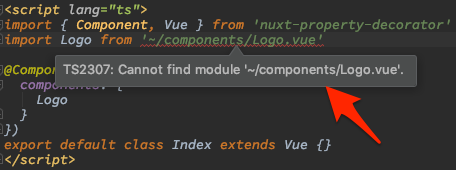
types ディレクトリを作って、 .vue ファイルの型定義ファイルを作ってあげるとエラーが消えます。
1 | |
